Introduction
aiXplain Agents are autonomous systems that plan, delegate, and adapt at runtime. On each run, an agent can break a goal into steps, select tools dynamically, call models and data sources, run code when needed, and continue under built-in access and policy enforcement until completion criteria are met.
There are two ways to build and deploy them:
aiXplain Studio: visual builder for non-technical users and mixed teams.SDK/API: technical path for developers who need code-level control.
How it fits together
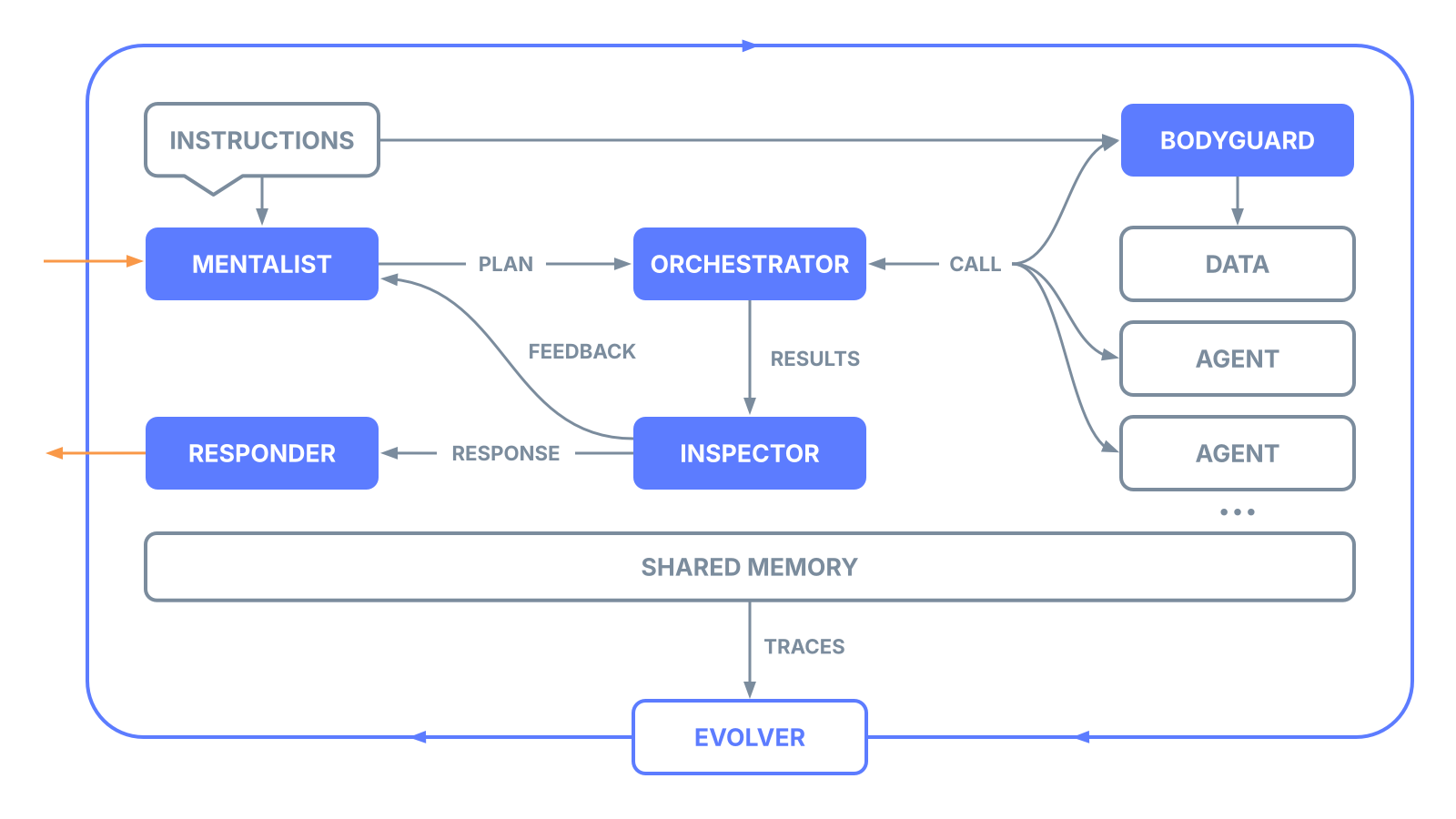
aiXplain agents: your application-level agent behavior and toolset.Micro-agents: runtime control agents shown in the diagram: Planner, Orchestrator, Inspector, Bodyguard, and Responder. They coordinate planning, execution, validation, and access control on each run. Inspector and Bodyguard operate inside the execution loop alongside human-in-the-loop checkpoints, enabling governance to scale beyond what human review alone can cover. See Inspectors.Meta-agents: lifecycle optimization agents that design, build, debug, deploy, and continuously improve user agents. Includes Mentalist, Architect, Matchmaker, Debugger, Butler, and Evolver. The Evolver pattern is documented here: Evolver.AgenticOS: runtime and control layer for execution, governance, memory, observability, deployment infrastructure, and data control.
Deployment flexibility
AgenticOS Cloud: fully managed deployment on aiXplain infrastructure. No infrastructure provisioning required. See Serverless.AgenticOS OnPrem: full on-prem deployment within your own infrastructure. Deploy on any cloud or server footprint, including bare metal, Kubernetes, and fully air-gapped setups, in any country/region. Data never leaves your network. See Private.
Who this is for
This documentation is for developers and technical teams who need to move from prototype to production without building orchestration, governance, and operations infrastructure from scratch. Non-technical users building agents visually should start with aiXplain Studio.
Use aiXplain when you need:
- Agent behavior that can adapt at runtime.
- First-class integration with tools, data, and external services.
- Access to 900+ AI models, tools, and integrations across vendors, with swappable models.
- Production controls for security, cost, quality, and reliability.
What can you build?
Deploy agents that reason over enterprise data, run multi-step workflows, and integrate with existing systems inside your firewall.
Ingest, retrieve, and synthesize information from large document collections, filings, and technical archives with GraphRAG.
Give agents natural language access to complex relational schemas with Text-to-SQL while keeping data inside your environment.
Compose networks of specialized agents where each agent can call others as tools and coordinate through the runtime.
Deploy agents with runtime compliance enforcement for regulated and high-trust use cases.
Provide internal teams or customers with a governed path to build and deploy agents using approved models, retrieval, and compliance controls.
What matters in production
Reliability: retries, model/tool fallback chains, and runtime error handling.Speed: fast prototyping, development, deployment, integration, and updates without rebuilding core orchestration.Governance: inspectors, scoped API keys, RBAC, and rate limits.Observability: full execution traces plus latency, usage, cost, and error metrics.Portability: managed cloud, VPC, and on-prem deployment options.Extensibility: bring your own models, tools, data, code, and MCP servers.
Multilingual and Arabic-first support
aiXplain agents handle Arabic and other right-to-left (RTL) languages natively across the full execution stack — agent instructions, user input, tool calls, sub-agent delegation, and response generation.
- Arabic instructions: Write agent prompts, roles, and constraints entirely in Arabic. The runtime serializes and delivers them to any underlying LLM without encoding issues.
- Full Unicode support: Diacritics (tashkeel), Arabic punctuation (
؛ ، ؟), Arabic-Indic numerals (٠١٢٣٤٥٦٧٨٩), and mixed-script content (Arabic + Latin) are preserved through the pipeline. - Multi-agent pipelines: Team agents with Arabic-speaking sub-agents work end to end — the orchestrator, planner, and inspector all handle Arabic content in delegation and aggregation steps.
- Model-agnostic: Arabic support is not tied to a specific LLM. Swap between OpenAI, Anthropic, Google, Meta, and other providers without changing your Arabic instructions or input handling.
This makes aiXplain suitable for production deployments in Arabic-first markets including legal, government, finance, and customer service use cases across the Middle East and North Africa.
Recommended start path
- Start with Quick Start to run your first agent.
- Review AgenticOS for runtime architecture and production design.
- Add tools and integrations from Tools.
- Configure runtime policy with Inspectors.
- Choose a deployment mode: AgenticOS Cloud or AgenticOS OnPrem.
- Configure operational controls with Workspaces, API Keys, and Credits & Billing.
- Use API Requests to integrate agents into your application stack.